
Download iDev Icon Collection – icon collection, icon pack, desktop customization, high-quality icons, icon library, iDev, Windows
Overview
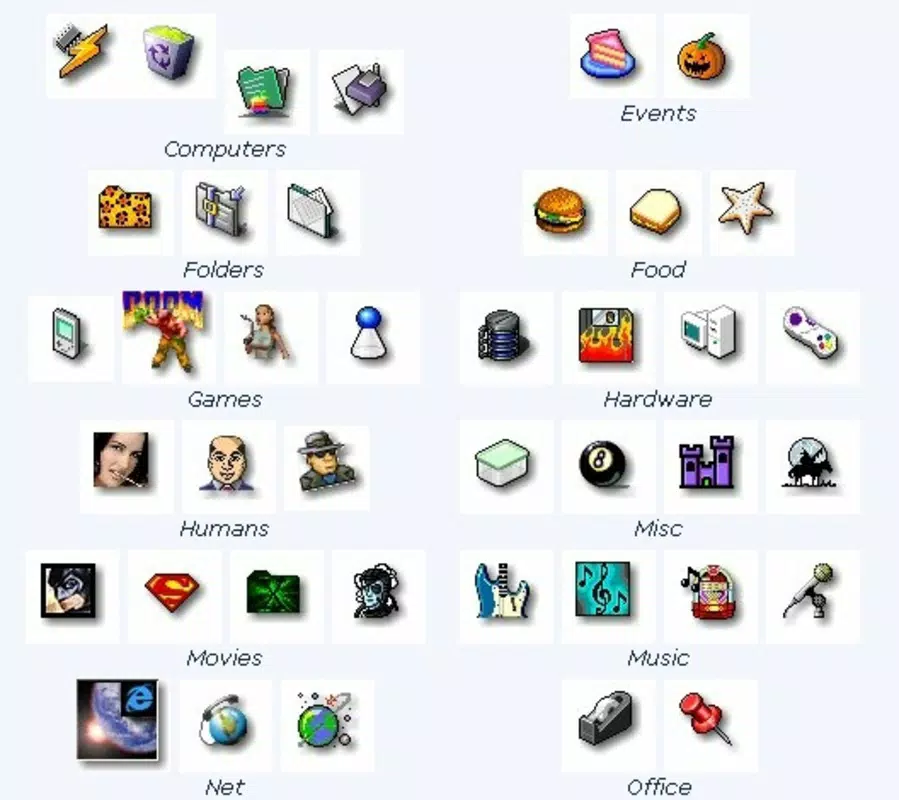
The iDev Icon Collection is a specialized digital tool designed for users seeking to enhance their desktop environment through visual customization. With a library of 16,000 high-quality icons organized into 24 distinct categories, this application serves as a comprehensive resource for individuals and professionals who require consistent, stylized iconography across personal or project-based workflows. The collection addresses the need for easily accessible, visually cohesive icons that can be used to personalize files, folders, and system menus, offering a streamlined solution for users who value aesthetic consistency and efficiency.
Targeted primarily at Windows users, the app caters to designers, developers, and power users who rely on visual cues to manage digital assets. It is particularly useful in environments where branding, file organization, or interface design is critical. The collection supports a wide range of applications, from personal file management to professional design projects involving interface mockups or software prototyping. Although the developer did not provide additional technical details, the app’s long-standing presence since its release on September 13, 2007, suggests reliability and sustained utility within its niche.
Within the broader app ecosystem, iDev Icon Collection occupies a unique position as a utility-focused resource. Unlike dynamic, interactive applications, it functions as a static asset library, emphasizing content quality and categorization. Its value lies in its ability to deliver a vast, well-organized selection of icons without requiring real-time processing or cloud integration, making it a dependable offline tool for visual enhancement.
Key Features & Functionality
- Vast Icon Library: The collection includes 16,000 icons, spanning diverse themes such as animals, food, science fiction, vehicles, and cartoons. This extensive selection ensures users can find a relevant icon for nearly any context, from organizing personal documents to designing software interfaces.
- High-Quality Visuals: All icons are rendered in pixel dimensions ranging from 16x16 to 64x64 pixels, maintaining clarity and sharpness across various display resolutions. This range allows for flexible use in both small UI elements and larger visual displays.
- Thematic Organization: Icons are grouped into 24 clearly defined categories, enabling quick and intuitive navigation. Users can efficiently locate icons based on subject matter, reducing search time and improving workflow efficiency.
- Compatibility with ICL-Enabled Tools: While the icons are not in ICO format, they are designed to work with ICL-supported programs such as Microangelo and Axialis IconWorkshop. This compatibility ensures seamless integration into existing design and customization pipelines.
- Offline Accessibility: As a self-contained resource, the collection does not require internet connectivity once installed, making it suitable for secure or restricted environments where online tools are unavailable.
For example, a software developer might use the collection to create a custom icon set for a new application, assigning distinct icons to different modules based on category. Similarly, a student organizing digital files could assign themed icons to folders for visual clarity. The collection’s static nature allows for consistent use across multiple projects without dependency on external services.
Interface, UX & Performance
The iDev Icon Collection does not feature a traditional user interface, as it functions primarily as a file-based asset library. Users interact with the collection through external software that supports ICL libraries, rather than through an embedded application interface. This design choice prioritizes functionality and compatibility over visual polish, aligning with its role as a backend resource.
Navigation within the library is facilitated through its 24-category structure, which enables users to browse and locate icons based on thematic relevance. While the developer did not specify formal performance metrics, the compact file size of 12.5 MB suggests efficient storage usage and minimal system overhead. The app is expected to load quickly on standard Windows systems, though performance may vary depending on the host software’s optimization and the user’s hardware configuration.
Responsiveness is dependent on the third-party tool used to access the icons, not the collection itself. Stability is likely maintained due to the static nature of the content, with no risk of crashes related to dynamic updates or background processes. However, users should ensure their chosen software is compatible with ICL files to avoid integration issues.
Platform Compatibility & Technical Requirements
The iDev Icon Collection is designed exclusively for the Windows operating system. It requires a Windows-compatible device to function, though specific version requirements were not listed by the developer. The application has a file size of 12.5 MB, which is relatively small, indicating that it does not demand significant disk space or system resources.
Although the developer did not specify minimum OS requirements or hardware capabilities, the app’s release date of September 13, 2007, suggests it is compatible with older Windows versions, including Windows XP and later. However, users on modern systems should verify compatibility with current Windows releases, especially if using newer software that may have stricter file format or security policies.
For users seeking to install or update the application, the process is straightforward, involving standard file extraction or installation procedures. The app does not require ongoing updates or cloud synchronization, making it a stable, one-time setup solution.
Pros and Cons
- Extensive library of 16,000 high-quality icons across 24 categories
- Compact file size (12.5 MB) with low system resource usage
- Well-organized thematic structure for efficient navigation
- Compatible with ICL-supported design tools like Microangelo and Axialis IconWorkshop
- Offline use without internet dependency
- Does not include icons in ICO format, limiting direct use in some applications
- No built-in interface or preview functionality
- Compatibility depends on third-party software, which may require additional purchase
- Developer did not provide detailed technical specifications or system requirements
- Released in 2007, so may lack support for modern Windows features
FAQ
Is the iDev Icon Collection free to download?
No, the app is available for purchase at $19.95. It is not a free tool, though it offers a large library of icons for a single upfront cost.
Can I use these icons in commercial projects?
Yes, the collection can be used for commercial purposes, provided that the user complies with the licensing terms of the third-party software used to access the icons.
What software can I use to open the iDev Icon Collection?
The icons are designed for use with ICL-supported programs such as Microangelo and Axialis IconWorkshop. These tools must be installed separately to access and utilize the icon library.
Is the iDev Icon Collection compatible with Windows 11?
While the developer did not confirm compatibility, the app’s long history suggests it may function on Windows 11. However, users should test it with their specific setup, as older applications may encounter issues with newer OS versions.
How do I update the iDev Icon Collection?
Since the app is a static asset library, there are no automatic updates. Users must manually obtain new versions or additional content from the developer if released.
Final Thoughts
The iDev Icon Collection remains a valuable resource for users focused on desktop customization and visual design on Windows. Its extensive library of 16,000 icons, organized across 24 categories, provides a rich foundation for personal and professional projects. While it lacks a modern interface and relies on third-party tools for functionality, its compact size and offline accessibility make it a reliable choice for those who prioritize content over convenience.
Designers, developers, and advanced users who require consistent, high-quality iconography will benefit most from this tool. Its ability to integrate with established ICL-compatible software ensures long-term utility within existing workflows. Although it has not been updated since 2007, its core functionality remains relevant in niche applications.
For anyone seeking a dependable, one-time purchase solution for icon customization, the iDev Icon Collection delivers consistent value. Download iDev Icon Collection now.


